Your approved JSA, now digital

Your approved JSA as a web app
in two weeks or less, guaranteed.

Turn your approved paper or PDF JSA into a mobile safety web app your crews can use in the field. Guided completion, required fields, multiple crew sign-offs, supervisor review, notifications, reporting, PDF exports, and a full audit trail.

This is not just an online form. It is a live safety workflow built around the JSA your company already approved.

2 Weekstypical first launch target
Multi-Signcrew sign-off on one record
Unlimitedupdates included
Paper to pocket

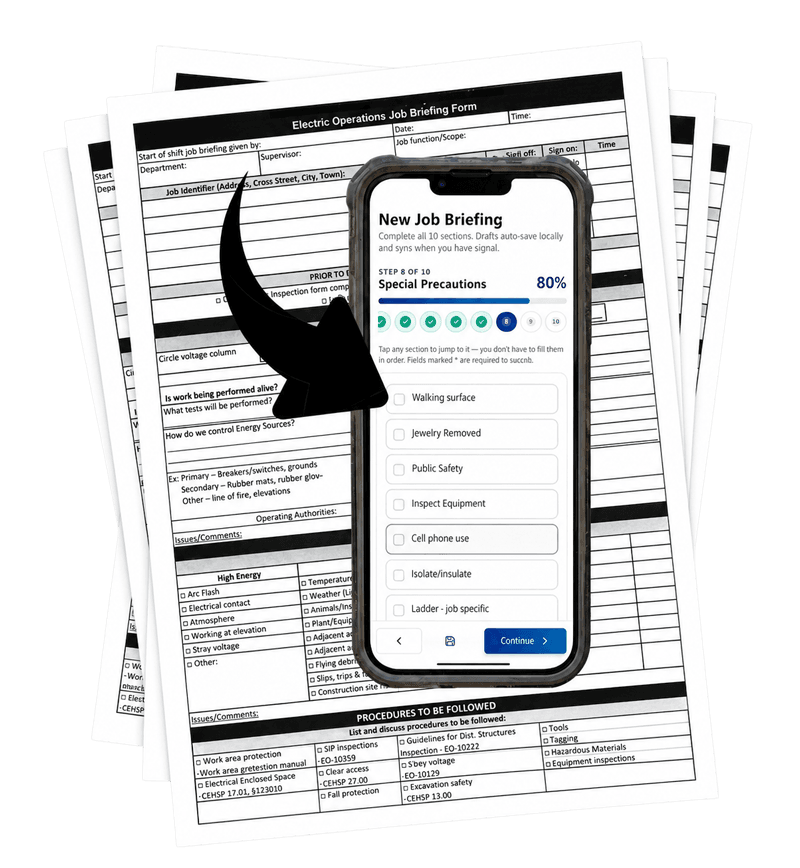
See the conversion from your existing paper form to the actual app.

We start with the JSA your team already uses. Then we convert it into a structured web application with step-by-step completion, digital signatures, routing, alerts, searchable records, and reporting.

Sample paper job briefing form
Existing paper form

Your current approved JSA

This is the kind of real-world form we start with β€” paper fields, job details, signatures, controls, and hazards. MyJSA preserves the approved process while making it easier to complete and manage.

β†’
Converted into
MyJSA.app
MyJSA job briefing app special precautions screen
Mobile web app output

The same workflow, now live in the field

Your form becomes a guided crew workflow with required steps, crew sign-off, supervisor routing, and audit-ready records β€” all from the phone each worker already has.

Why this matters: crews see a cleaner, easier version of the same approved process, while management gets real-time visibility, notifications, and a searchable safety record instead of loose paper.
Why MyJSA

Paper JSAs are familiar. That does not mean they are reliable.

Most companies already have a JSA, JHA, job briefing, tailboard briefing, pre-task plan, or permit process. The problem is what happens after the form leaves the office.

πŸ“‹

Paper gets rushed

Fields get skipped, signatures are hard to verify, and supervisors may not know what is missing until the work is already underway.

πŸ””

Management needs alerts

MyJSA can notify supervisors and administrators when JSAs are submitted, pending, overdue, or missing before the workday starts.

πŸ“Š

Safety needs data

A completed paper form is a record. A web application can show trends, hazards, missing signatures, review delays, and compliance gaps.

Injury Reality 2.5M

U.S. employers reported 2.5 million private-industry injury and illness cases in 2024.

Fatal Risk 5,070

Workers died from work-related injuries in 2024 β€” one every 104 minutes.

Digital Gap 11%

Only 11% of EHS teams report fully digital systems; most still operate with a mix of paper, spreadsheets, PDFs, and software.

Adoption Barriers 4 blockers

Safety teams want better tools, but cost, training time, employee compliance, and implementation friction slow software adoption.

Worker Buy-In 83%

83% of employees say they are open to trying and using new safety technologies in the workplace.

Process Preserved MyJSA

MyJSA converts the safety forms companies already use into mobile workflows with signatures, approvals, PDF exports, and audit trails.

Not a form tool

A web application, not an online document.

DocuSign, Google Forms, and similar tools can collect signatures or responses. MyJSA manages a safety workflow.

  • Assigned jobs, crews, supervisors, and user roles
  • Required fields and signature gates before submission
  • Multiple people signing the same JSA record
  • Automatic routing to supervisors after crew submission
  • Immediate notifications for missing, pending, or overdue JSAs
  • Live dashboard, reporting, searchable records, PDF exports, and audit logs
The point: Your JSA becomes a living database and accountability system β€” not just a fillable online form.

What MyJSA preserves

Your approved questions, checklist items, PPE prompts, procedure references, signature acknowledgements, PDF record, and workflow rules.

What MyJSA adds

Mobile completion, validation, shared crew sign-off, supervisor approval, notifications, reporting, exports, version history, and unlimited updates.

From paper to pocket

The field workflow your crews can actually use.

The same approved JSA becomes a guided mobile workflow with large tap targets, section progress, required fields, auto-save drafts, and signature capture.

1Open assigned JSA
2Complete required sections
3Crew signs and submits
4Supervisor receives it

When the crew signs and submits, the form is automatically routed to the assigned supervisor for review. If multiple workers are assigned to the job, each worker can sign the same shared JSA record from their own phone.

MyJSA mobile briefing special precautions screen
How it works

Launch your current JSA as a mobile app.

No internal IT project. No generic form builder. No forced rewrite of your safety process.

Send your JSA

Upload your PDF, paper form, Word document, briefing, permit, or checklist.

We convert it

Your approved form becomes a guided mobile web app with rules, signatures, notifications, and exports.

Crew submits

Crew completes, signs, and submits. The form is automatically sent to the supervisor.

Supervisor approves

Supervisors review, sign, approve, or request changes from the field submission.

Admins see everything

Management gets live visibility into missing, pending, approved, and overdue records.

Admin & Oversight

The view from the office.

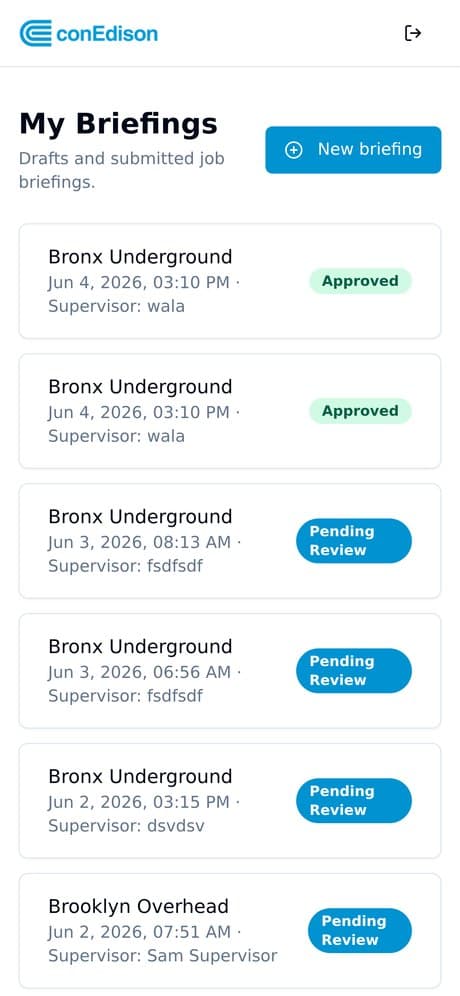
Once crews submit from the field, supervisors and admins get a live operations dashboard, filterable reports, notifications, and a full audit trail β€” no more chasing paper across the yard.

MyJSA admin panel dashboard screen
πŸ””

Immediate alerts

Notify management when required JSAs are submitted, awaiting review, missing, or not completed prior to the workday.

πŸ“ˆ

Live reporting

Track briefings over time, top hazards, departments, pending drafts, approvals, and review queues.

πŸ”

Audit-ready records

Every completed record can include timestamps, user identity, signatures, PDF exports, and audit history.

What you get

Everything your JSA needs to become operational.

MyJSA is managed for you, including setup, hosting, support, form changes, and unlimited updates.

βœ“

Your approved JSA converted

We preserve your safety process while making it mobile, structured, and easier to complete.

βœ“

Multiple crew signatures

Each assigned worker can sign the same JSA record, with name, time, user identity, and form version.

βœ“

Supervisor routing

Submitted JSAs are automatically sent to the assigned supervisor or safety manager for review.

βœ“

Pre-job gate notifications

Management can be alerted when a required JSA is not completed before the workday or scheduled start.

βœ“

PDF export and searchable archive

Completed JSAs are stored, searchable, and exportable for records, clients, audits, or incident review.

βœ“

Unlimited updates included

Change wording, fields, checklist items, procedure references, required sections, or notification rules.

Coming soon

From recordkeeping to leading indicators.

A mobile JSA can tell you whether the briefing was completed before work started, who signed, who did not sign, what hazards were selected, and where risk patterns are appearing.

Pre-job tracking

Track required JSA completion against scheduled job start times.

Missing JSA alerts

Notify supervisors and administrators before work begins when required documentation is missing.

Compliance scoreboards

View completion rates by crew, department, supervisor, job type, or week.

Offline sync

Complete and sign in low-signal areas, then sync when the connection returns.

Trend analytics

Identify recurring hazards, repeat gaps, late briefings, and delayed reviews.

AI hazard prioritization

Use JSA data to help surface likely risk areas and recommended controls.

FAQ

Questions safety teams usually ask.

Is MyJSA just an online form?

No. MyJSA.app is a web application, not just a web form. A form tool collects information. MyJSA manages a safety workflow with assigned crews, user roles, multiple signatures, supervisor routing, notifications, reporting, PDF exports, searchable records, and audit logs.

Why not just use DocuSign or another form tool?

DocuSign-style tools are useful for document completion. A JSA is more than a document. MyJSA helps answer whether the JSA was completed before work started, who was assigned, who signed, who did not sign, whether it was approved, and whether management needs to be alerted.

Can multiple people sign the same JSA?

Yes. A crew lead can complete the JSA, then each assigned crew member can open the same briefing and add their own signature from their own phone. The system can track completed and missing signatures.

Can MyJSA notify management when a JSA is missing?

Yes. MyJSA can notify supervisors, administrators, or management when a required JSA has not been completed before the workday or scheduled job start.

Does MyJSA replace our approved JSA?

No. MyJSA is designed to preserve your approved JSA. We use your current form, checklist, procedure references, required fields, and signature requirements as the starting point.

Can we update the form later?

Yes. Unlimited updates are included, so your app can keep pace as your safety process changes.

Get Started

Move your approved JSA from paper to phone.

Send us the basics. We will review your company’s current JSA process and outline the fastest path to convert your approved form into a mobile safety web app.

No pressure. No software demo required just to talk. We will review your current process and explain what it would take to move your approved JSA from paper to phone.

Live Demo

See the working MyJSA demo.

Explore the crew workflow, supervisor review, and admin panel in the live demo environment.

Open Live Demo β†’